

YubiKey MFA Setup & Troubleshooting Guide
Mideye supports YubiKey hardware tokens as a second authentication factor. When a user authenticates, they enter their password followed by a one-time password (OTP) generated by touching the YubiKey button. The 44-character modhex OTP is validated by the Mideye infrastructure.

YubiKey types and serial prefixes
Section titled “YubiKey types and serial prefixes”| Type | Serial format | OTP validation | Example |
|---|---|---|---|
| Mideye-provided | ubbc + 8-digit serial | Mideye token service | ubbc06434510 |
| Commercial (third-party) | zmub + 7–8-digit serial | YubiCloud (Yubico) | zmub05761949 |
How it works
Section titled “How it works”When a user touches their YubiKey, it produces a 44-character modhex OTP:
cccccddbefrkdtteflufklvhtdljffhdkcierivligfrThe first 12 characters are the public identity. The remaining 32 characters are the encrypted OTP payload. The Mideye Server routes validation based on the serial prefix.
Modhex character set
Section titled “Modhex character set”YubiKey OTPs use 16 keyboard-layout-independent characters:
c b d e f g h i j k l n r t u vValidation architecture
Section titled “Validation architecture”Mideye-provided YubiKeys (ubbc)
Section titled “Mideye-provided YubiKeys (ubbc)”User → YubiKey OTP → Mideye Server → Mideye Switch → Token Gateway → Token ServerCommercial YubiKeys (zmub)
Section titled “Commercial YubiKeys (zmub)”User → YubiKey OTP → Mideye Server → Mideye Switch → Token Gateway → Token Server → YubiCloudProvision a Mideye-provided YubiKey (ubbc)
Section titled “Provision a Mideye-provided YubiKey (ubbc)”Step 1 — Obtain the serial number
Section titled “Step 1 — Obtain the serial number”The 8-digit serial number is printed on the back of the YubiKey.
If not readable: insert the key, open a text editor, touch the button, and read the first 12 characters. All Mideye-provided YubiKeys start with ubbc.
Step 2 — Register the serial in the user repository
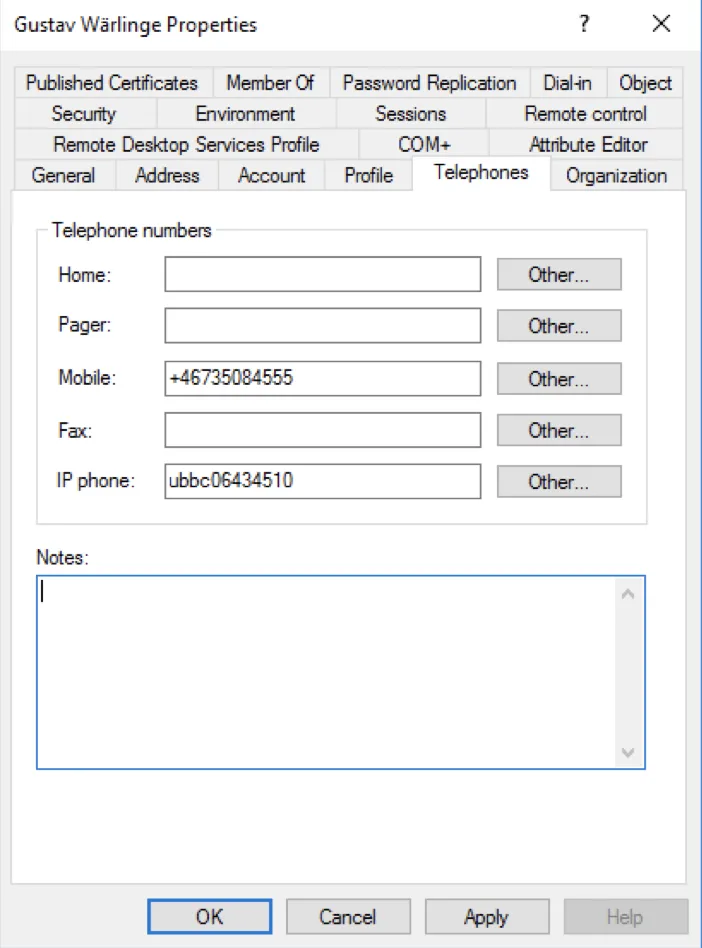
Section titled “Step 2 — Register the serial in the user repository”Add the serial (e.g., ubbc06434510) to the user’s directory entry.
Active Directory: The default attribute is ipPhone. This can be changed in the LDAP profile configuration under User Attributes.
Step 3 — Set authentication type to Token
Section titled “Step 3 — Set authentication type to Token”The user’s authentication type must be set to 3 (Token).
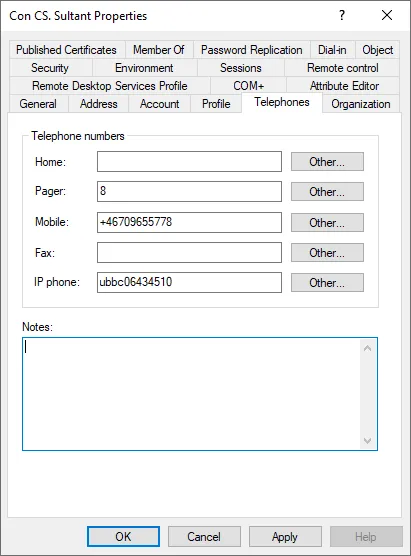
Option A — Token serial in the mobile phone field:
If the ubbc serial is in the mobile phone field, Mideye Server automatically assigns the Token type. Set the Token Number parameter to the mobile phone field.
Option B — Separate authentication type attribute:
- In the LDAP profile → Authentication tab, check Read Optional Attributes.
- Specify an Authentication Type Attribute (default for AD:
pager).
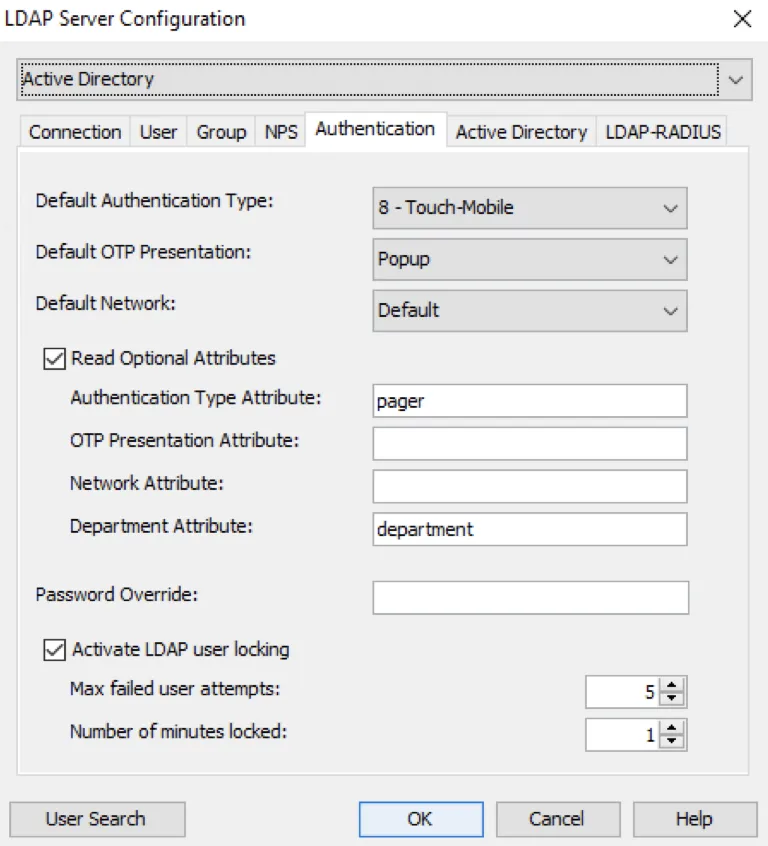
- Set the user’s
pagerattribute to3.
Provision a commercial YubiKey (zmub)
Section titled “Provision a commercial YubiKey (zmub)”Prerequisites
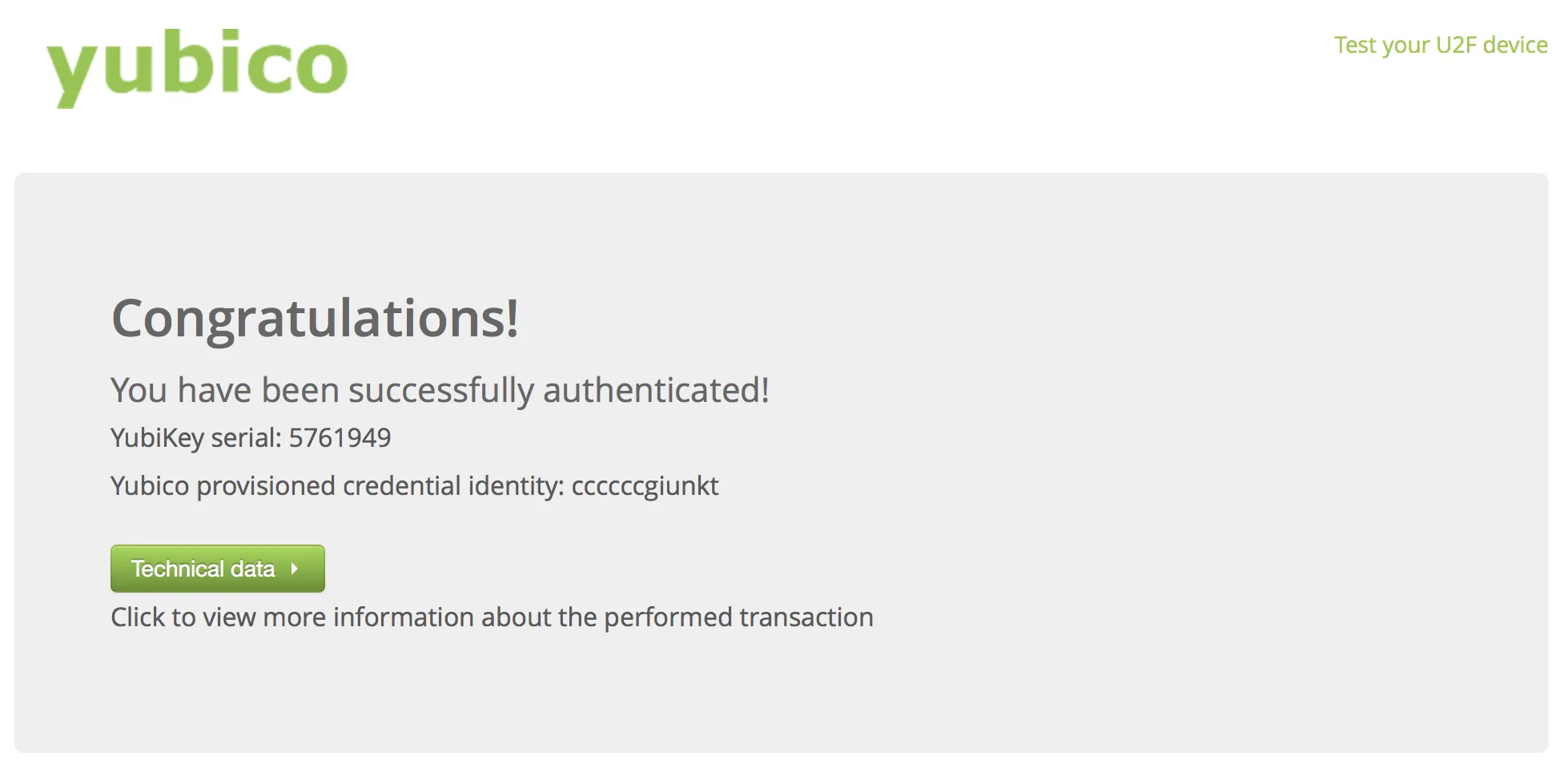
Section titled “Prerequisites”- The YubiKey must be registered with YubiCloud. Factory keys from Yubico are pre-configured.
- Verify at demo.yubico.com. If it fails, upload at upload.yubico.com.
Custom keys
Section titled “Custom keys”| OTP prefix | Key type |
|---|---|
cccc | Factory pre-configured (standard YubiCloud) |
vvcc | Custom key (must be uploaded to YubiCloud) |
Custom keys require the RADIUS client setting: Client Configuration → Allow YubiKeys with custom keys.
Step 1 — Obtain the serial number
Section titled “Step 1 — Obtain the serial number”From demo.yubico.com/otp/verify, or:
- Touch the YubiKey to generate an OTP.
- Copy characters 5–12 (e.g.,
cccccckdnhjr…). - Convert with the Yubico ModHex Converter.
Step 2 — Register with zmub prefix
Section titled “Step 2 — Register with zmub prefix”Add the serial as zmubXXXXXXXX in the user repository.
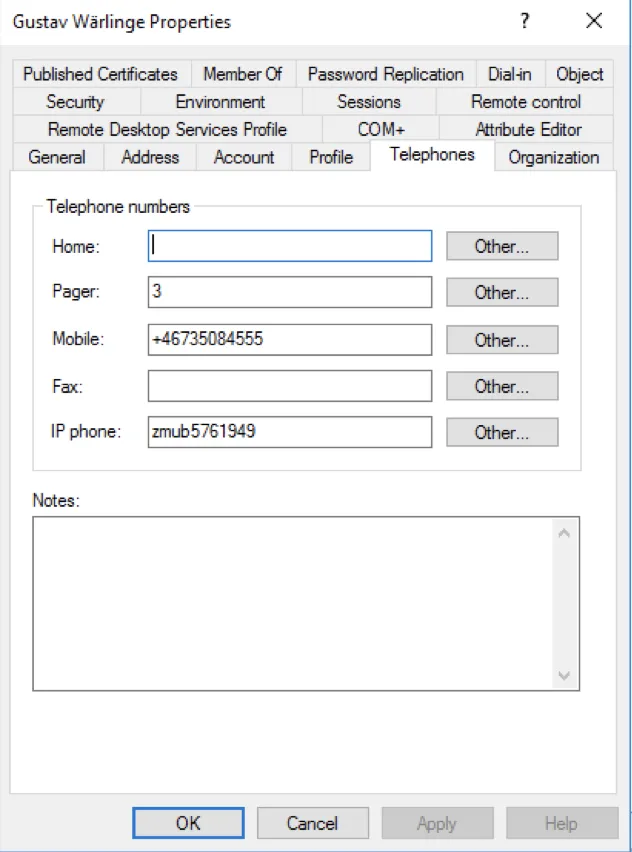
Step 3 — Set authentication type to Token
Section titled “Step 3 — Set authentication type to Token”Same as for Mideye-provided YubiKeys — set the attribute to 3.
Troubleshooting
Section titled “Troubleshooting”| Symptom | Likely cause | Resolution |
|---|---|---|
TOKEN_NOT_FOUND | Serial not registered | ubbc: contact Mideye Support. zmub: verify at demo.yubico.com |
WRONG_OTP / BAD_OTP | Validation failed | Verify correct key, check for damage |
LOCKED | Too many failures | Contact admin to unlock |
TOKEN_OUT_OF_SYNC | Counter mismatch | Touch the key several times, retry |
REPLAYED_OTP | Same OTP used twice | Generate a fresh OTP |
| Login times out | Network issue | Check server logs and Switch connectivity |
Wrong prefix
Section titled “Wrong prefix”ubbckey registered aszmub→ sent to YubiCloud which doesn’t have the secret → failszmubkey registered asubbc→ sent to Mideye token server which doesn’t have it →TOKEN_NOT_FOUND
Quick reference
Section titled “Quick reference”| Detail | Mideye-provided | Commercial |
|---|---|---|
| Serial prefix | ubbc | zmub |
| OTP length | 44 characters (modhex) | 44 characters (modhex) |
| Validation | Mideye token server | YubiCloud |
| Internet required | Depends on deployment | Yes |
| Auth type | 3 (Token) | 3 (Token) |
| AD attribute (serial) | ipPhone (default) | ipPhone (default) |
| AD attribute (auth type) | pager (default) | pager (default) |
Related links
Section titled “Related links”- Authentication Types — Complete list of authentication types
- HID Tokens — HID Mini Token card provisioning
- On-premise TOTP Tokens — Software and hardware TOTP tokens